
YouTube LUFS Target: Integrated Loudness, True Peak & dBTP — complete guide
For many YouTube creators, -14 LUFS integrated is a useful starting point, but it is not a universal rule or a guarantee of loudness after upload. Measure the finished mix, control true peaks, and check the result after YouTube processing. This guide explains what integrated LUFS means, how to verify normalized volume, and which export choices affect speech clarity.
If your video sounds quiet or gets turned down, first separate three questions: what loudness you measured before export, whether peaks clipped during encoding, and what YouTube reports in Stats for Nerds. A target number alone cannot fix an imbalanced voice, music, or noise floor.
The workflow below is written for creators, podcasters, and editors. It follows audio-engineering principles and links to platform documentation, while noting where platform behavior can change. For a quick tool workflow, use AudioForge Pro's browser-based normalizer, then listen to the exported file before replacing the track.
1. What is LUFS and Why Does It Matter for Creators?
The Difference Between dB and LUFS
To understand normalization, we first have to clarify the terminology. Most creators are used to seeing dB (Decibels) meters in their editing software. While dB measures the absolute highest point of a sound wave (the 'Peak'), it does not tell you how loud a human brain actually perceives that sound. A sharp snare hit might hit -3 dB, but a sustained vocal at -10 dB will sound much louder because it has more energy over time.
LUFS (Loudness Units relative to Full Scale) is the modern global standard meant to bridge this gap. Unlike peak meters, LUFS measures perceived loudness. It is modeled after the human ear's frequency response, meaning it prioritizes the frequencies where our hearing is most sensitive—specifically the human voice range.
When we talk about 'Integrated LUFS,' we are talking about the average loudness of your entire video from start to finish. This is the number YouTube cares about.
2. Why YouTube Picked the -14 LUFS Standard
You might wonder why YouTube settled on -14 LUFS. Why not -16 (like Apple Podcasts) or -24 (like Broadcast TV)?
For years, the internet was the 'Wild West' of audio. This era was known as the Loudness Wars. Creators would compress their audio as much as possible, making it incredibly loud just to stand out. The result was a terrible user experience where every transition between videos was a volume shock.
YouTube implemented the -14 LUFS standard to end this. It is a 'Sweet Spot.' It provides enough headroom—the space between the average volume and the distortion point (0 dB)—to allow for natural dynamics. This means your whispers can sound like whispers, and your explosions can sound like explosions, without the overall volume jumping around.
Verification Tip: Stats for Nerds
If you want to see how YouTube is treating your current videos, right-click on any of your videos and select 'Stats for nerds.' Look for the line that says 'Volume / Normalized.'
- If it says '100% / 100% (content loudness 0.0dB)', you hit the target perfectly.
- If it says '100% / 60% (content loudness 4.4dB)', it means your audio was 4.4dB too loud, and YouTube turned it down by 40% to protect the listener.
- If it says '100% / 100% (content loudness -3.0dB)', your audio is -3.0dB too quiet. In most cases, YouTube will not turn quiet audio up; it stays quiet, making your video less engaging than the competition.
3. The Danger of Positive LUFS Correction
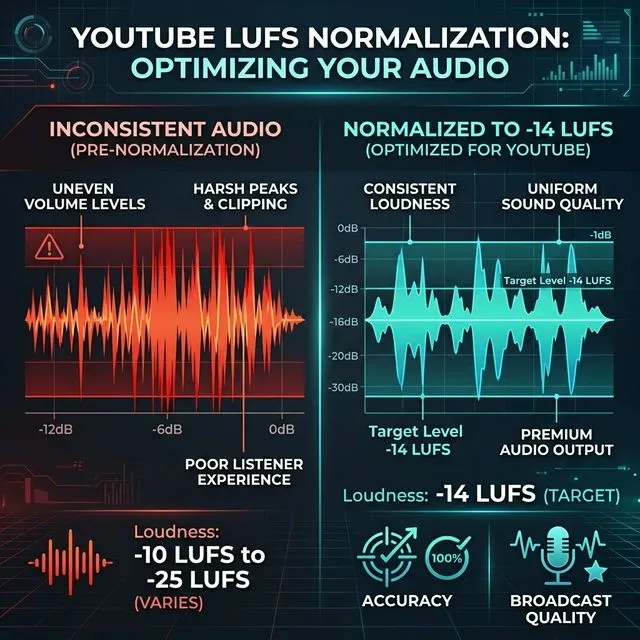
Many creators mistakenly think, 'If I am too quiet, YouTube will just turn it up.' This is a dangerous assumption. While YouTube is testing 'Stable Volume' features that attempt to boost quiet tracks, the results are often plagued by a high noise floor. When you boost quiet audio, you also boost the background hiss, air conditioning hum, and PC fan noise.
By using the AI Silence Remover and LUFS Normalization together in AudioForge Pro, you clean the noise first, and then boost the voice. This ensures a 'Professional Black' background—silence is actually silent, and the voice is commanding and clear.
If background noise is still a problem before you even reach the normalization stage, work through our 2026 Guide on Removing Background Noise.
4. How AudioForge Pro Achieves Studio-Grade Normalization
Traditionally, achieving -14 LUFS required expensive plugins like iZotope Ozone or complex setups in Adobe Audition. AudioForge Pro brings that same processing power directly to your browser for free. Our engine uses the ITU-R BS.1770 integrated loudness measurement standard standard—the same one used by professional broadcast engineers.
Precision True Peak Limiting
One of the biggest mistakes creators make is ignoring True Peaks. A standard meter might tell you your audio is safe at -1.0 dB, but 'Inter-sample peaks' can actually exceed 0 dB when the file is converted to a compressed format like AAC or MP3 for YouTube. This causes a digital 'crackling' effect that ruins your audio quality.
AudioForge Pro uses a -0.1 dBFS True Peak Limiter. This means even after compression, your audio stays clean, transparent, and distortion-free. We have optimized this process to be lightning-fast, handling even large podcast files in under 60 seconds.
5. Platform Standard Comparison: Where to Target Your Audio
While this guide focuses on YouTube, you are likely sharing your content elsewhere. Each platform has its own 'target,' and hitting the wrong one can lead to your audio sounding weak compared to others in the feed.
| Platform | Target LUFS | Recommendation |
|---|---|---|
| YouTube | -14 LUFS | The gold standard for video. |
| Spotify | -14 LUFS | Matches YouTube for parity across mobile apps. |
| Apple Podcasts | -16 LUFS | Slightly quieter to preserve vocal dynamics. |
| Amazon Music | -14 LUFS | Consistent with the modern streaming target. |
| Netflix / TV | -27 LUFS | Much quieter to allow for massive cinematic range. |
| TikTok / Reels | -12 to -14 LUFS | Often louder to punch through on mobile speakers. |
For most digital creators, -14 LUFS is the safest universal target. If you normalize to -14, you will sound professional on almost every platform without needing separate exports for each.
6. What "Content Loudness -6.0 dB" Actually Costs You
Here is the situation this section is really about, and you can check whether it applies to you in about ten seconds. Open one of your own videos, right-click the player, choose Stats for Nerds, and read the content loudness line. If it says something like -6.0 dB, your upload was well under the target and YouTube is not going to lift it for you. The video simply plays quieter than the one before it in the viewer’s session.
That is a small friction, but it lands at the worst possible moment. A viewer arriving from a louder video reaches for the volume control before they have heard your first sentence. Nobody leaves a comment about it, which is exactly why it goes unnoticed for months.
The fix is a three-step pass and it takes about a minute per video:
- Silence removal: tighten gaps so pacing does not sag, without clipping word endings.
- Noise cleanup: reduce the steady room air so normalization does not simply amplify the noise floor.
- Loudness normalization: measure the finished mix and bring integrated loudness to around -14 LUFS with true peak held at or below -1 dBTP.
I am not going to attach a retention percentage to that, because the honest answer is that audio is one input among many and I cannot isolate it in someone else’s analytics. What I can tell you is what to watch: re-run Stats for Nerds after the change and confirm the content loudness line sits near 0.0 dB. That is the part that is actually measurable and entirely within your control.
If you want to master the pacing side of this equation, our YouTube Shorts Audio Retention Guide covers gap timing in detail.
7. Step-by-Step Workflow for Perfect Normalization
Here is how to use AudioForge Pro efficiently within your existing video editing pipeline:
Step 1: Export Your Final Mix
Once you finish your edit in Premiere Pro, CapCut, or DaVinci Resolve, export a high-quality WAV or MP3 of just your audio. Ensure your background music is already mixed relative to your voice.
Step 2: Upload to AudioForge Pro
Drag your file into the tool. Our browser-side processing means you aren't uploading to a cloud server—it is fast and private.
Step 3: Apply the 'Creator Formula'
We recommend enabling both AI Silence Removal and YouTube LUFS Normalization. This combination removes the dead air and then brings the remaining audio to the professional standard.
Step 4: Verify and Download
Hit 'Process.' You will see a real-time progress bar. Once finished, download the new file and replace the original audio track in your video project before your final video export.

8. Common Myths About Audio Normalization
Myth 1: 'Normalization is the same as Compression'
False. Compression changes the ratio between loud and quiet parts (it squashes them). Normalization is more like a 'Global Volume Knob.' It keeps the relationship between your quietest and loudest parts the same but moves the whole thing up or down to the target level. For the best sound, use a little compression in your DAW first, then use AudioForge Pro for the final normalization.
Myth 2: 'Louder is Always Better'
This was true in 2012, but not in 2026. If you upload audio at -8 LUFS (very loud), YouTube will simply turn it down. However, extreme loudness usually requires heavy limiting, which 'flattens' your voice and makes it sound tiring to listen to. The goal is to reach -14 LUFS while keeping your voice sounding natural and punchy.
Myth 3: 'WAV is required for good normalization'
While WAV is technically higher quality, AudioForge Pro's engine handles MP3 and AAC with extreme precision. If you are uploading to social media, a high-bitrate MP3 (320kbps) normalized to -14 LUFS will sound indistinguishable from a WAV to 99% of your audience.
If the format side is still unclear, our companion guide on 128kbps vs 320kbps vs WAV: Does Bitrate Actually Matter? explains which of those choices YouTube actually re-encodes and which ones change what your viewers hear.
9. Conclusion: The One-Minute Investment
Consistency creates trust. When your audio levels are professional, your brand feels professional. By spending sixty seconds running your final audio track through a proper LUFS normalizer, you are removing the single biggest barrier between your content and a satisfied viewer.
Take control of your loudness today. Use our free audio normalization tool to ensure that every video you upload sounds exactly how you heard it in your studio—consistent, clear, and algorithm-ready.
Transparent Disclosure: The author is the Founder of Audio Forge Pro. Recommendations reflect genuine relevance to this topic. Core audio processing is free with no login required.
Responses
Join the community discussion. Sign in with Google to post a comment after the page finishes loading.