
Article content
For the MP3 vs M4A format choice, M4A usually holds AAC, which sounds cleaner than MP3 at the same bitrate, most audibly at 128 kbps and below. It is also the iPhone Voice Memos format. MP3 plays on nearly every device since the late 1990s. Keep M4A for Apple and modern apps; use MP3 for older hardware.
What Is the Difference Between MP3 and M4A?
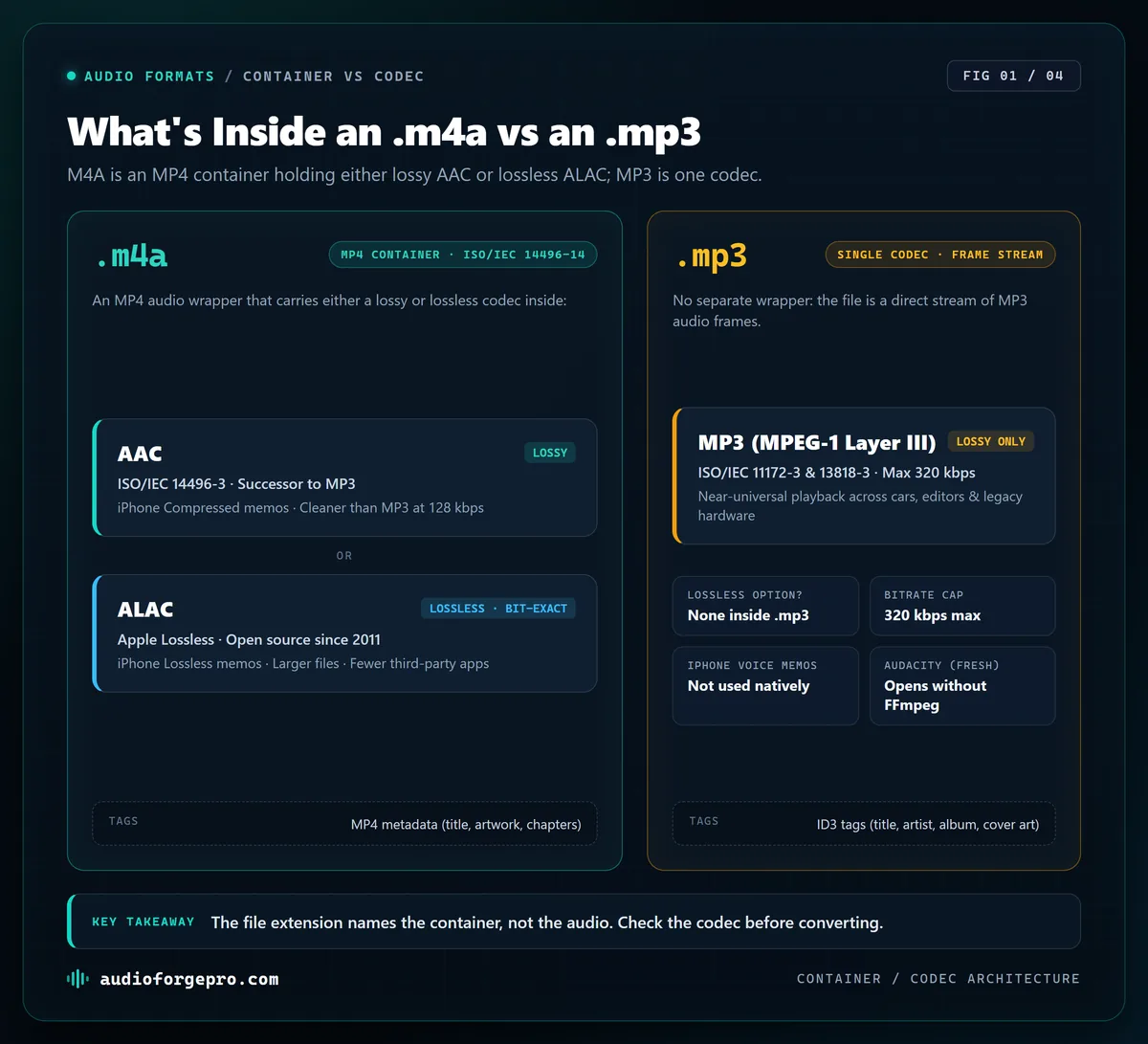
The two names describe different things. MP3 is a codec and a file type in one. M4A is a container, and the codec inside decides how it sounds. Most of the confusion in forum threads about these formats comes from comparing the two as if they were the same kind of thing.
| Feature | MP3 | M4A |
|---|---|---|
| What it is | Codec and file type in one | MP4 audio container |
| Codec inside | MP3 (MPEG Audio Layer III) only | AAC (lossy) or ALAC (lossless) |
| Standard | ISO/IEC 11172-3 and 13818-3 | ISO/IEC 14496-3 for AAC, MP4 file format for the container |
| Top bitrate | 320 kbps in the MPEG-1 Layer III table | No 320 kbps cap; ALAC is lossless |
| At 128 kbps | Artifacts on cymbals, applause and sibilance | Generally cleaner on the same material |
| Compatibility | Near-universal, including older car stereos | Universal on current phones and computers; older hardware varies |
| iPhone Voice Memos | Not used | Default recording format |
| Tags | ID3 | MP4 metadata (title, artwork, chapters) |
What Is Inside an M4A File: AAC vs ALAC?
An MP3 file is a run of MP3 frames, each with its own small header. The codec defines the whole file. An .m4a file uses the MPEG-4 file format, the same family as .mp4 video. Apple adopted the .m4a extension to mark an MP4 file that carries audio only.
Inside, you will usually find AAC (Advanced Audio Coding), specified in ISO/IEC 14496-3. MPEG developed it as the successor to MP3. The other common option is ALAC, Apple Lossless, which Apple released as open source in 2011. ALAC compresses without discarding anything, so a decoded ALAC file matches the original samples bit for bit.
The m4a vs aac question comes up when someone exports a file named .aac. That file usually holds the same codec as an ADTS stream: AAC frames with no MP4 wrapper, limited tagging, and weaker seeking in some players. The .m4r iPhone ringtone and .m4b audiobook are the same MP4 container with a different extension.
| Extension | Container | Typical codec | Lossy or lossless |
|---|---|---|---|
| .mp3 | None (MP3 frame stream) | MP3 | Lossy |
| .m4a | MP4 | AAC | Lossy |
| .m4a | MP4 | ALAC | Lossless |
| .aac | ADTS stream | AAC | Lossy |
| .m4b | MP4 with chapters | AAC | Lossy |
| .m4r | MP4 | AAC | Lossy |
To see which codec you have, open the file in QuickTime Player and choose Window > Show Movie Inspector, which lists the format as AAC or Apple Lossless. On Windows, the free MediaInfo utility shows the same field.
How Do MP3 and M4A Sound at 128, 192 and 256 kbps?
The m4a vs mp3 quality gap comes from codec design. MP3 runs audio through a hybrid filter bank in 576-sample granules. AAC uses a single transform on 1024-sample frames, switches to eight short blocks on sharp attacks, and adds temporal noise shaping. Those tools target pre-echo, the smeared click you hear before a snare hit at low MP3 bitrates.
MPEG's 1998 stereo verification tests reported that AAC Main and Low Complexity profiles at 128 kbps met the EBU's indistinguishable-quality criterion, and that AAC Main Profile at 96 kbps scored better than MP3 at 128 kbps. Those tests used 1990s MP3 encoders. Modern MP3 encoders closed much of the gap, so the margin shrinks as bitrate rises. At 256 kbps both formats sound transparent to most listeners on most material.
| Bitrate | MP3 | AAC in M4A | Practical verdict | Size per minute |
|---|---|---|---|---|
| 128 kbps | Swishy cymbals and pre-echo on hard material | Cleaner on most material | AAC has a clear edge | 0.96 MB |
| 192 kbps | Good for most listening | Close to transparent | Small AAC edge | 1.44 MB |
| 256 kbps | Near-transparent | Near-transparent | Choose by compatibility | 1.92 MB |
| 320 kbps | MP3 maximum | Rarely needed | Use when a device needs MP3 | 2.40 MB |
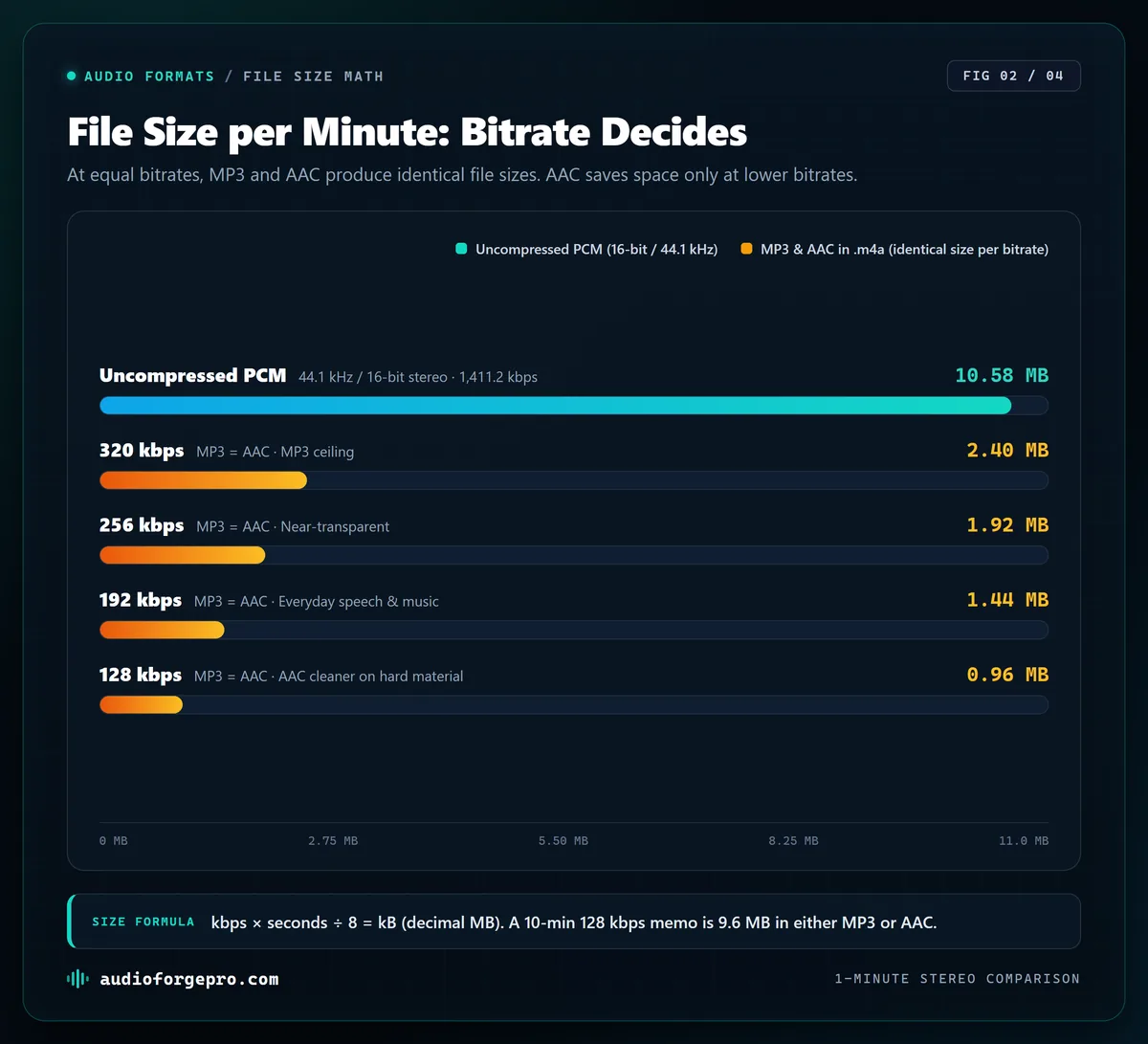
File size follows bitrate, not codec. The math is kbps times seconds divided by 8, which gives kilobytes. A 10-minute memo at 128 kbps is 128 x 600 / 8 = 9,600 kB, or 9.6 MB, whether it is AAC or MP3. AAC saves space only because you can drop to a lower bitrate for the same perceived quality.
Lossless is a different scale. Uncompressed 44.1 kHz, 16-bit stereo runs at 1,411.2 kbps, or about 10.58 MB per minute. ALAC shrinks that without loss, by an amount that depends on the material. For the uncompressed side of the comparison, the WAV vs MP3 size guide works through the same math.
Where Does M4A Fail to Play or Edit?
iPhone Voice Memos
Voice Memos saves every recording as .m4a. Its Audio Quality setting, under Settings > Voice Memos (inside Apps on newer iOS versions), offers Compressed or Lossless. Compressed produces AAC. Lossless produces ALAC, which is several times larger and which more third-party apps refuse. If you send memos to Windows users or an editor, Compressed avoids most surprises.
Windows Editors and Audacity
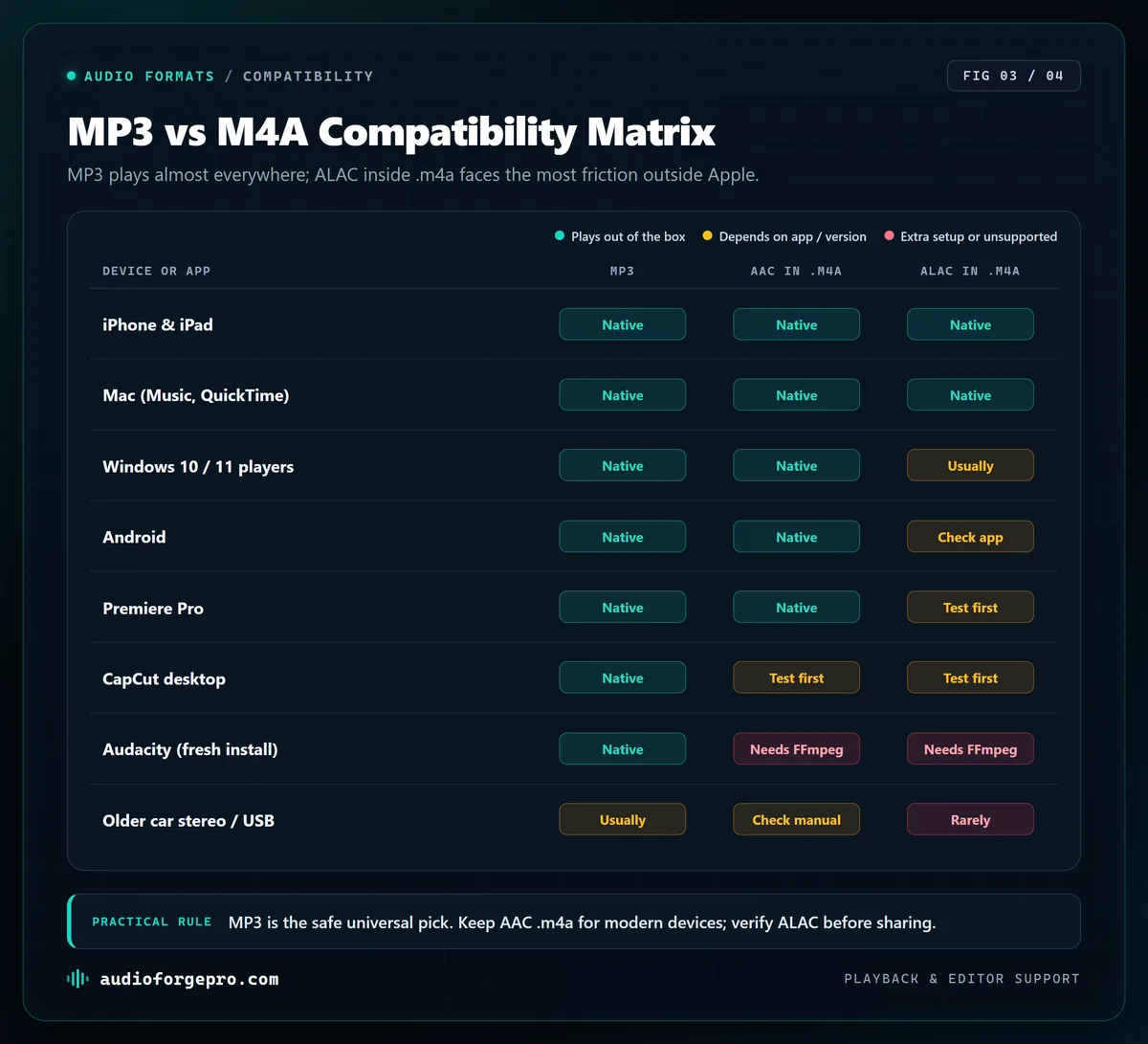
Windows 10 and 11 play AAC .m4a files in their built-in players. Audacity is the usual stumbling block: it opens M4A through the optional FFmpeg library, so a fresh install rejects the file until FFmpeg is added. MP3 and WAV open without it.
Video Editors and the Hidden Start Offset
Premiere Pro imports AAC .m4a directly. ALAC support varies by editor and version, so test a short clip before you build a timeline on it. AAC has a quirk worth knowing when you line a memo up with camera audio. Apple's documentation describes 2,112 priming samples at the start of an AAC stream. That is 47.9 ms at 44.1 kHz and 44.0 ms at 48 kHz.
A player that reads the file's edit list trims those samples. Software that ignores it shifts the audio by that fixed amount. A constant offset of a few dozen milliseconds behaves differently from audio that slowly drifts out of sync in CapCut, where the gap grows over the clip.
Podcast Hosts
Apple Podcasts accepts both MP3 and AAC in MP4/M4A for RSS feed episodes (subscriber uploads in Apple Podcasts Connect take WAV, FLAC or MP3). Other hosts and older podcast apps sometimes expect MP3 only. Check your host's upload requirements before converting anything.
Older Car Stereos and USB Players
Head units from the 2000s and early 2010s often list MP3 and WMA as their only formats. ALAC fares worse still. The supported-files table in the manual is the only reliable answer.
| Device or app | MP3 | AAC in .m4a | ALAC in .m4a |
|---|---|---|---|
| iPhone and iPad | Native | Native | Native |
| Mac (Music, QuickTime) | Native | Native | Native |
| Windows 10/11 players | Native | Native | Usually |
| Android | Native | Native | Check app |
| Premiere Pro | Native | Native | Test first |
| CapCut desktop | Native | Test first | Test first |
| Audacity, fresh install | Native | Needs FFmpeg | Needs FFmpeg |
| Older car stereo or USB player | Usually | Check manual | Rarely |
When Should You Keep M4A or Convert to MP3 or WAV?
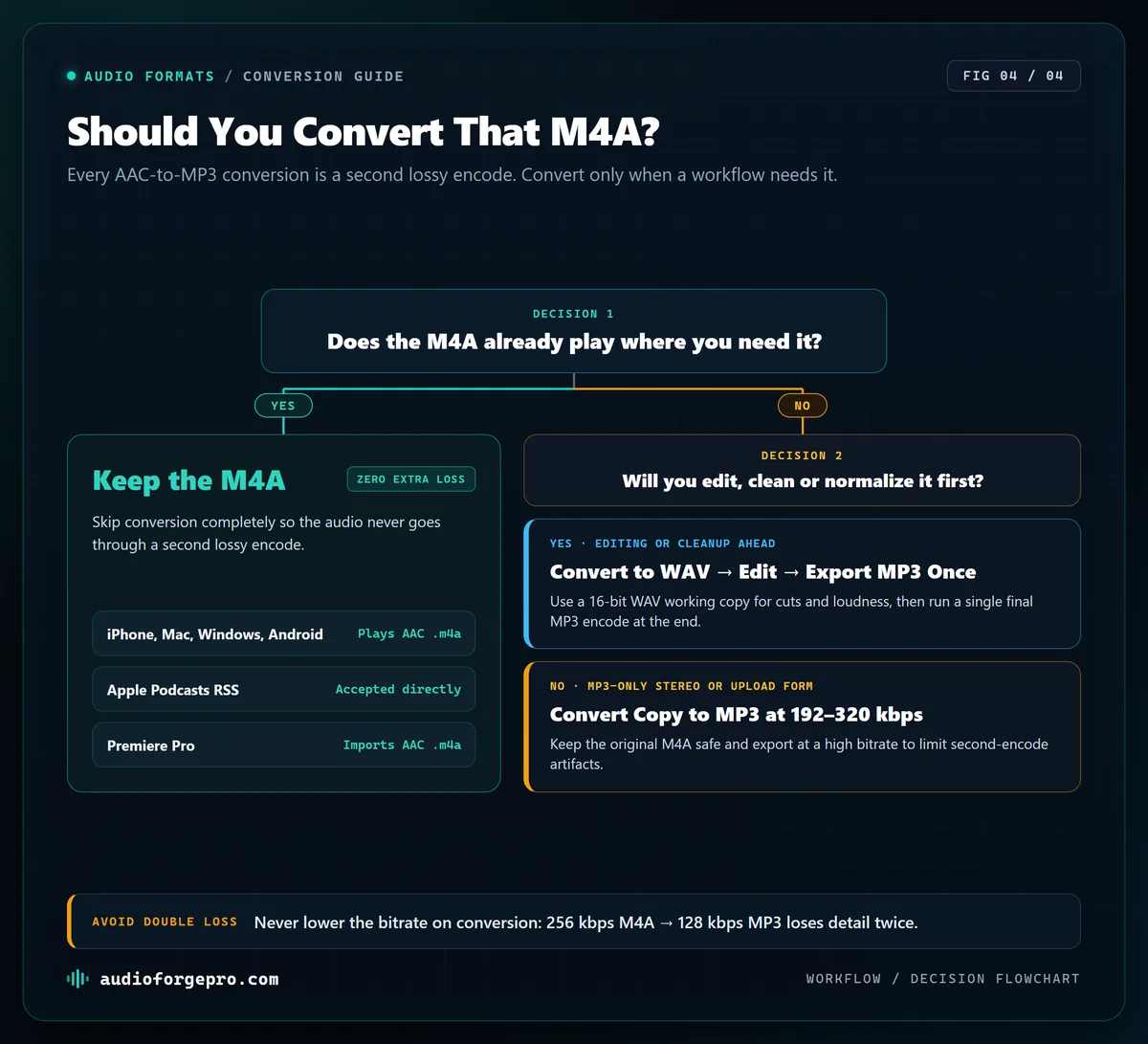
Every AAC-to-MP3 conversion is a second lossy encode. The MP3 encoder discards detail it judges inaudible, on top of what AAC already removed, and the artifacts add up. Converting once at a high bitrate is fine. Repeating it across several rounds of edits is where quality slips.
| Your situation | Do this | Why |
|---|---|---|
| The M4A already plays where you need it | Keep it | No new loss |
| An old car stereo or an MP3-only upload form | Convert a copy to MP3 at 192 or 320 kbps | A high bitrate limits damage from the second encode |
| You will cut, clean or set loudness | Convert to WAV, export MP3 once at the end | No loss between edits |
| An archive of Lossless memos | Keep ALAC or convert to WAV | Both are lossless |
| Several memos for one episode | Join them, then encode once | One encode instead of one per clip |
To trim dead air off the start of a memo and save it as MP3, open it in the audio trimmer. Exports are 16-bit WAV or MP3 at 128, 192 or 320 kbps, with no watermark and no account. A 24-bit Lossless memo saved to WAV here comes out at 16-bit, so keep the original if you archive at 24-bit.
For a series of memos, the audio joiner takes up to 30 files and 90 minutes of audio, puts them in the order you set, and writes one file. Screen recordings and phone videos arrive as MP4 or MOV; the audio extractor pulls their soundtrack out before you join or trim it.
Which Should You Pick?
- Recording on an iPhone and staying in Apple apps? Keep M4A with Compressed quality.
- Sending files to a mixed group of phones, PCs and cars? MP3 at 192 kbps plays everywhere.
- Archiving interviews you may edit later? Lossless ALAC or WAV, never a lossy file alone.
- Editing a memo for a podcast? Work in WAV and encode MP3 once at the end.
- Streaming or storing music at 128 kbps or below? AAC in M4A gives better sound for the space.
Sources
- ISO/IEC 11172-3: MPEG-1 Audio, including Layer III (MP3)
- ISO/IEC 14496-3: MPEG-4 Audio, including AAC
- ISO/IEC 14496-14: MP4 file format
- ISO/IEC JTC1/SC29/WG11 N2006: Report on the MPEG-2 AAC Stereo Verification Tests (1998)
- Apple QuickTime File Format, Appendix G: Audio priming and AAC encoder delay
- Apple Lossless Audio Codec (ALAC) open-source release
- Apple Support: Change settings in Voice Memos (Compressed vs Lossless Audio Quality)
- Apple Podcasts for Creators: Audio requirements
- Android Developers: Supported media formats
- Audacity Support: Installing FFmpeg
Transparent Disclosure: The author is the Founder of Audio Forge Pro. Recommendations reflect genuine relevance to this topic. Core audio processing is free with no login required.
Responses
Join the community discussion. Sign in with Google to post a comment after the page finishes loading.