
How to Make Nightcore Music Online (Free, No Download) — complete guide
Nightcore is a song played faster with the pitch left to follow. That one sentence separates it from every other remix format, and it explains why so many nightcore makers online produce a file that sounds wrong. They speed the track up and then raise the pitch again, so the lift lands twice.
This guide skips the three-step preset tour. If you only came for a nightcore converter, the four steps near the end are enough. If you want the file to survive an upload, keep reading.
What Nightcore Actually Is
Nightcore began as a school project in Norway around 2001 to 2002. Thomas S. Nilsen and Steffen Ojala Søderholm sped up trance and Eurodance records with cheap software and let the pitch climb with the tempo, which is the entire recipe. The name came from their own handle. The duo's tracks reached YouTube in 2006, other uploaders took over from there, and anime edits gave the format a second life. The history on Wikipedia covers the five albums they made before the project ended.
The first Nightcore tracks were roughly 25 to 30 percent faster than the songs they borrowed, which put a trance record near 160 to 180 BPM. The figure quoted most often today is about 35 percent, and both numbers sit inside what people make now: a ratio between 1.22x and 1.45x, with 1.30x at the centre. Under about 1.2x listeners hear a quick copy of the original. Past roughly 1.8x the voice stops sounding like a person. If the difference between this format and a plain speed-up is still fuzzy, the breakdown of sped-up audio and why it took over short video covers the gentler end of the same slider.
The Math Behind the Sound
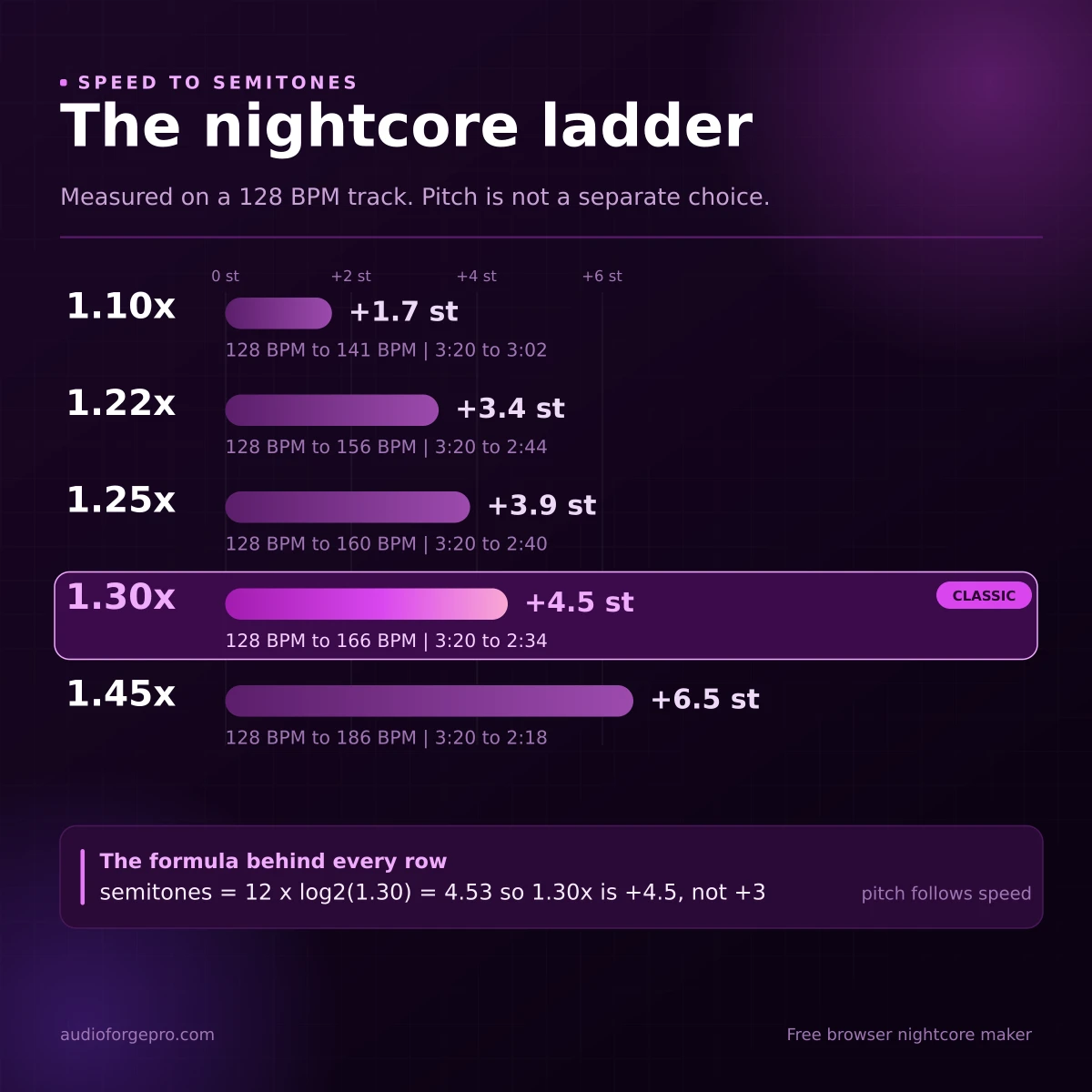
In a resampler, tempo and pitch are the same control. Speed the audio up and every frequency rises with it, which is why this format can be made in one move and why a time-stretcher cannot make it at all. The conversion is twelve times the base-two logarithm of the ratio, and it is exact rather than approximate. Audacity's manual makes the relationship blunt: at a speed multiplier of 2.000 the clip plays twice as fast and the pitch rises by exactly one octave.
| Speed | Semitones | 128 BPM becomes | 3:20 becomes |
|---|---|---|---|
| 1.10x | +1.7 | 141 | 3:02 |
| 1.22x | +3.4 | 156 | 2:44 |
| 1.25x | +3.9 | 160 | 2:40 |
| 1.30x | +4.5 | 166 | 2:34 |
| 1.45x | +6.5 | 186 | 2:18 |
This table is where most preset labels fall apart. A maker that advertises 1.25x with plus three semitones is describing a lift that does not match its own speed, because 1.25x already carries +3.86. Either the tool applies pitch twice, or it quietly holds the pitch back so the file never becomes nightcore at all.
Perception sits on top of all that. Brightening a vocal shifts the resonances that make a voice sound like a particular body, which is why the result reads as younger and lighter instead of simply quicker. Low, breathy singers survive the lift better than dense mid-heavy mixes, where guitars and cymbals start competing for the same space.
High female leads take the lift most gracefully. A low baritone is a different singer by 1.45x.
Nightcore, Sped-Up, Daycore, Slowed
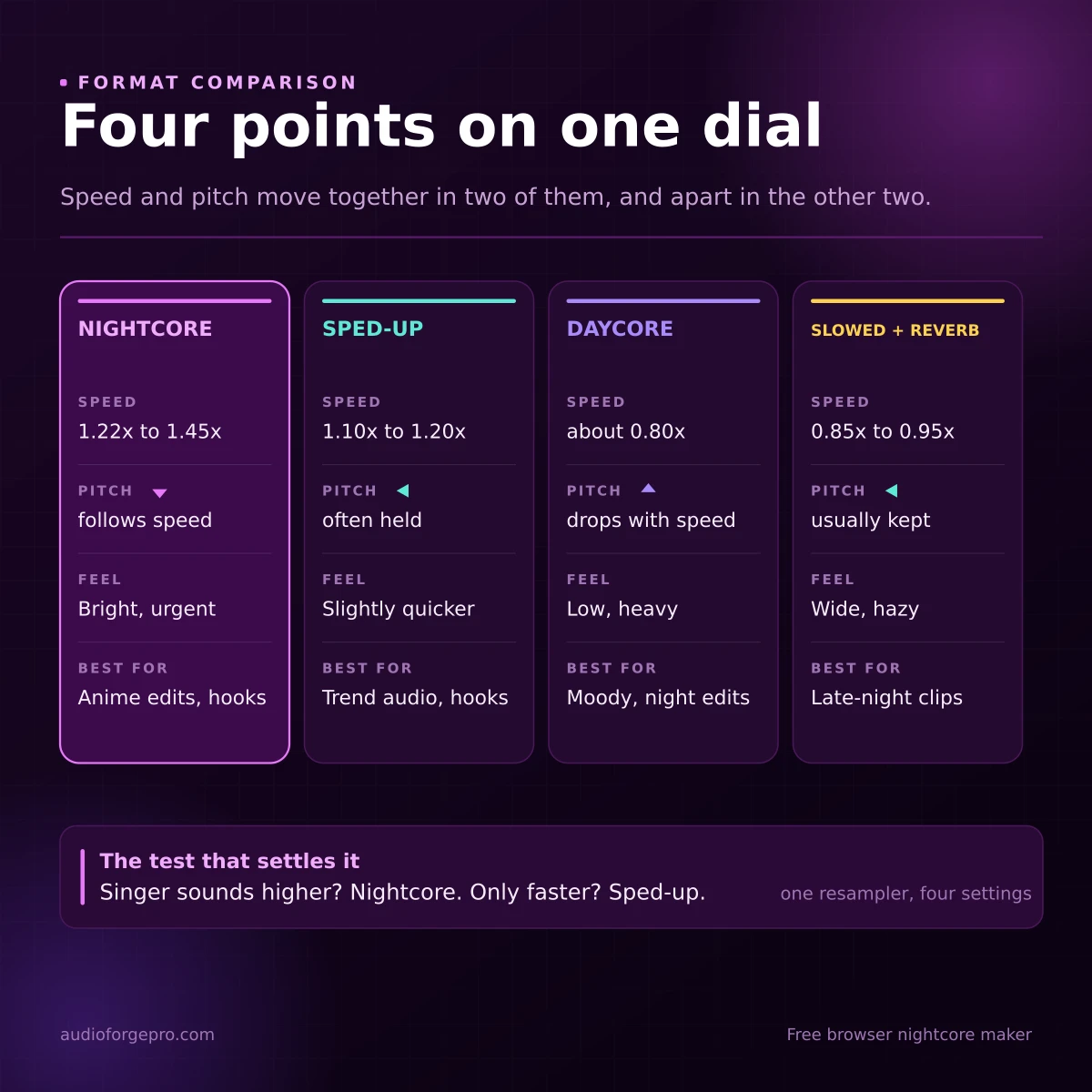
Nightcore versus sped-up is the comparison that comes up most, but four names get used as if they were one effect.
- Nightcore: speed and pitch rise together, usually 1.22x to 1.45x, bright and urgent.
- Sped-up: the same resampling at gentler ratios, 1.10x to 1.20x, built for hooks and short-form edits.
- Daycore: the mirror image around 0.8x, lower and heavier, often with a little reverb.
- Slowed and reverb: tempo drops, pitch is usually preserved, then space is added on top. That is a separate job from the slowed and reverb tool, because the two controls come apart.
Why Nightcore Exports Clip
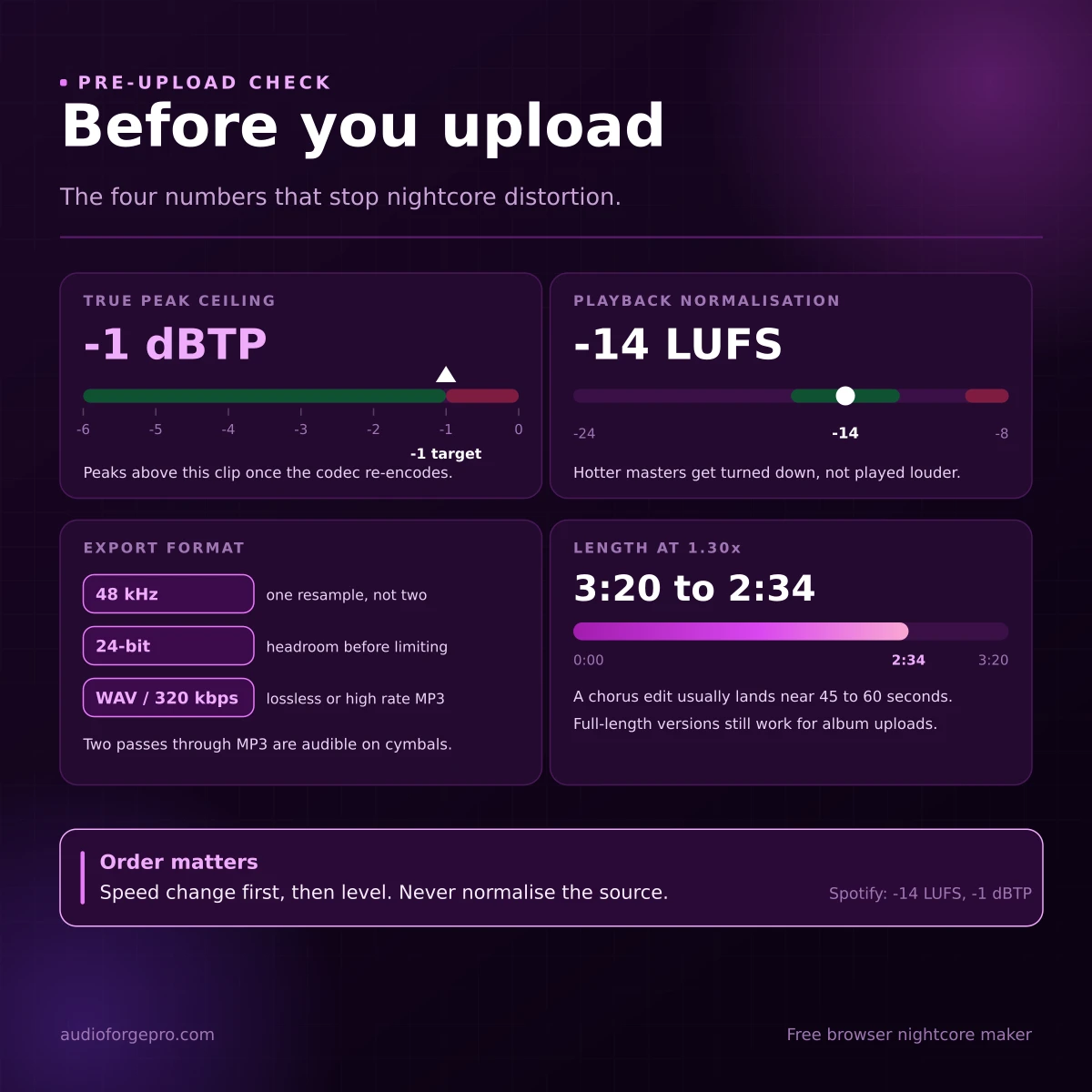
Speeding a track up does not only move frequencies. It changes the waveform between the samples. A resampled file regularly measures several tenths of a decibel above its sample peak, and that hidden level is what a limiter never sees, because the limiter is watching numbers that are not the real ones. The same thing happens again inside the encoder. Lossy formats rebuild the waveform on decode, and the rebuilt peaks can cross 0 dBFS even when the source never did, which is where audible crackle on a loud export comes from. A decibel of headroom covers both cases, and that is the whole trick behind nightcore without clipping.
| Check | Target | Why it matters |
|---|---|---|
| True peak | -1 dBTP | codecs overshoot on decode and clip above 0 |
| Integrated loudness | -14 LUFS | where Spotify and YouTube normalise playback |
| Sample rate | 48 kHz | one resample instead of two |
| Bit depth | 24-bit | headroom before the limiter |
Lossy sources make the second problem worse. Take a 128 kbps MP3, lift it five semitones, and the top end the encoder threw away comes back as a bright smear. Start from WAV or a 256 kbps file when the choice exists, and export once. Two passes through MP3 are audible on cymbals and sibilance.
None of that can be repaired after export. The source decides how far the lift will go.
Make One in the Browser, Four Steps
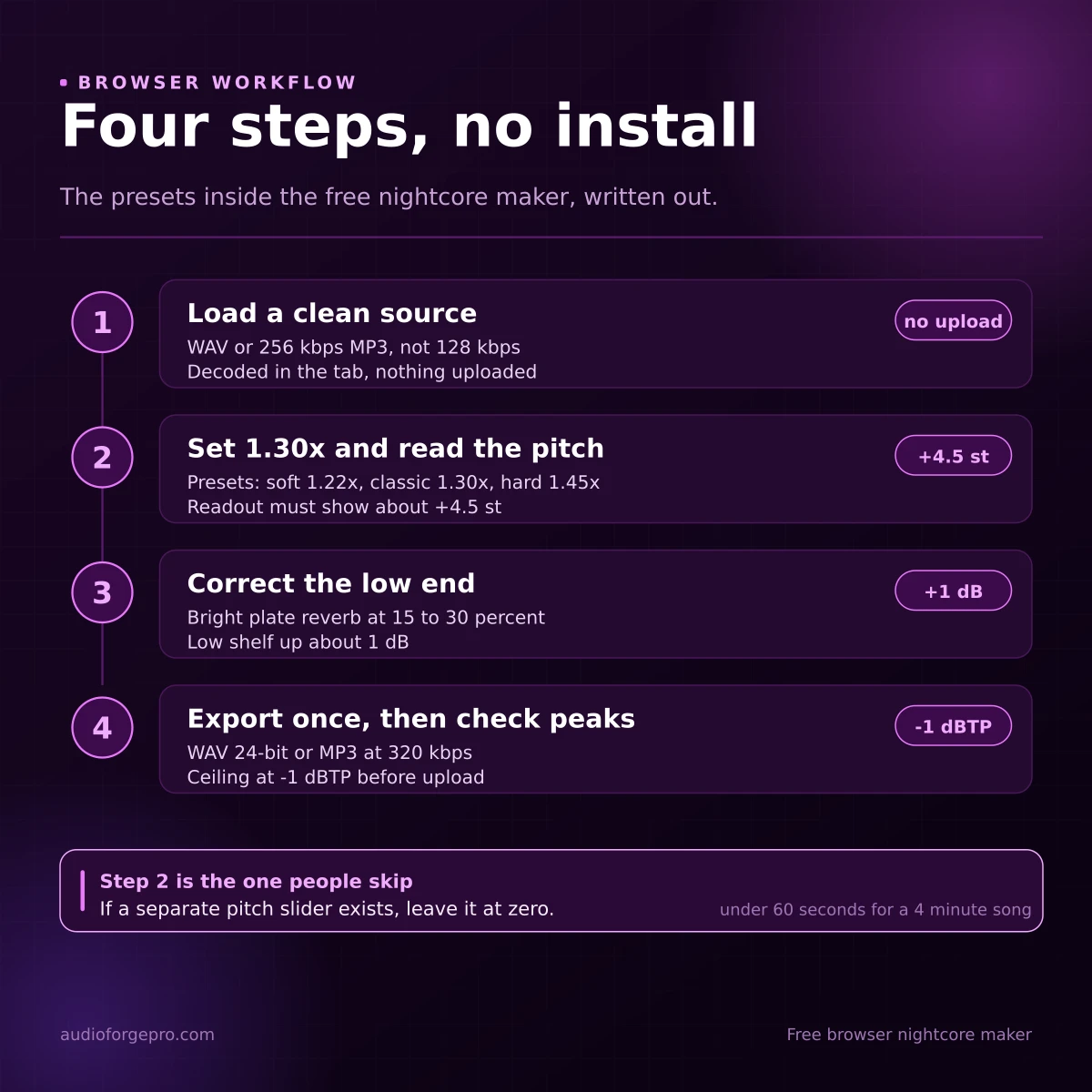
Step 1: Load a clean source
Use your own recording, a licensed track, or a file you have permission to edit. Drop it into the nightcore maker. Nothing is uploaded, decoding happens in the tab, and the export carries no watermark.
Step 2: Set the ratio, then read the semitones
Start at 1.30x. The three presets map to that range: soft at 1.22x, classic at 1.30x, hard at 1.45x. Check the readout before you render, because it should show roughly +4.5 semitones and the new duration. If a separate pitch control exists, leave it neutral and let speed do the work.
The maker ships three presets, and each one is a fixed ratio rather than a slider. These are the exact results on a 3:20 source track: lengths and semitones follow from the ratio, while the level targets are what an export should aim for, not measurements taken from one particular file.
| Preset | Speed | 3:20 becomes | After export |
|---|---|---|---|
| Soft | 1.22x (+3.4 st) | 2:44 | -1 dBTP, -14 LUFS |
| Classic | 1.30x (+4.5 st) | 2:34 | -1 dBTP, -14 LUFS |
| Hard | 1.45x (+6.5 st) | 2:18 | -1 dBTP, -14 LUFS |
Step 3: Recover the low end
Resampling thins the bass, so a small correction helps. A bright plate at 15 to 30 percent and about +1 dB of low shelf is the usual polish, and the reverb tool is there when the track needs more air than the preset offers. Past about 30 percent the vocal disappears behind the effect.
Step 4: Export once, then check peaks
WAV if the file enters a video editor, 320 kbps MP3 if it goes straight to a platform. Then run it through the loudness normalizer and confirm the ceiling before upload.
Editing a Chorus, Not a Whole Album
Most nightcore that travels is a chorus, not an album cut. Speed the hook, keep the verse at normal speed, and the lift lands harder because contrast does the work. The audio speed changer handles one region with section handles, trim the file first if the loop needs a clean start point, and join the parts back together when the arrangement has to sit in sequence.
For stem work, pull the vocal with the vocal remover, nightcore only the acapella, then rebalance it under the untouched beat. It is the cleanest way to keep drums natural while the voice goes bright. A gentle lift at the hook is also how to make a sped-up version that reads as a different edit rather than the same file twice.
Anime Edits, AMVs and Gaming Cuts
The format grew inside anime edits because Japanese pop and rock already sit high and fast, so a 20 percent lift lands inside a range the genre can carry. Gaming montages use the same trick for a different reason: nightcore compresses a build into the first eight seconds, which is roughly the attention a highlight reel gets before a thumb moves.
When the edit is for a faceless channel, the audio is the voice of the video, and pacing matters more than the ratio. The faceless gaming audio workflow covers that side properly. If the goal is movement rather than speed, the 8D audio maker pans the mix instead of pitching it, and the two effects stack badly.
The Copyright Line Nobody Reads
Changing speed and pitch does not create a new copyright and does not give you ownership of the song. A nightcore version is a derivative of both the recording and the composition, so the same claim applies to it. Content ID scans every upload against a database of owner-submitted files and can block, monetise or track the video, and audio recognition vendors now sell derivative detection on purpose. A five percent shift is not camouflage.
Four routes stay reasonably safe. Your own recording. Music you licensed, with the licence covering modification. Royalty-free music whose terms allow editing and monetisation. An official nightcore or sped-up release from the artist or label. None of them guarantees a clean upload, because a claim can still arrive and be resolved later, and this paragraph is general information rather than legal advice.
A pitched-up file is still the same song, with the same owner.
Publishing Without Losing the Point
Three things decide whether an upload travels: the first five seconds, the title, and the loudness.
- Lead with the hook at the new tempo. A slow intro at 1.3x is still a slow intro.
- Put the song name in the title. Search demand for nightcore versions runs through the track, not the format.
- Keep the file at the platform's loudness instead of above it. A hotter master gets turned down anyway.
- Say which ratio you used. It is the detail other editors copy.
Matching the platform ceiling
Spotify normalises playback to -14 LUFS integrated and asks for a true peak under -1 dBTP, leaving a decibel of headroom for lossy encoding. YouTube lands in the same region, so a file mastered at -8 LUFS is not louder in the end, only flatter. Treat -14 LUFS as a common streaming target rather than a law: the platform's own loudness settings, the web player, TVs and speakers can all play the same file at a different level. The LUFS and dB guide explains the difference between the two scales, and our own normalizer aims at the streaming figure directly.
Mistakes That Show Up in Every Second Export
- Pitching twice, once through speed and once through a pitch slider.
- Starting from a 128 kbps file and lifting it five semitones.
- Adding reverb to hide artefacts, which adds more high-frequency noise to the same band.
- Exporting at -0.1 dBFS with no true peak ceiling, then blaming the platform for the distortion.
- Nightcore-ing a whole track when only the chorus needed the lift.
The Short Version
Upload a track to the nightcore maker, set 1.30x, leave pitch on follow, add a little bright reverb and bass, then export at 320 kbps or WAV. That is the entire recipe, and it takes under a minute for a four minute song. The numbers around it, which semitones, which ceiling, which ratio suits a given tempo, are what separate an edit that sounds intentional from one that sounds processed.
Transparent Disclosure: The author is the Founder of Audio Forge Pro. Recommendations reflect genuine relevance to this topic. Core audio processing is free with no login required.
Responses
Join the community discussion. Sign in with Google to post a comment after the page finishes loading.