
Article content
WAV vs MP3 comes down to stage. WAV is uncompressed PCM, about 10.6 MB per minute at 16-bit, 44.1 kHz stereo, and suits recording, editing and archiving with no generation loss. MP3 is lossy, about 1.4 MB per minute at 192 kbps, and suits sharing, podcasts and limited storage.
Quick Decision Table
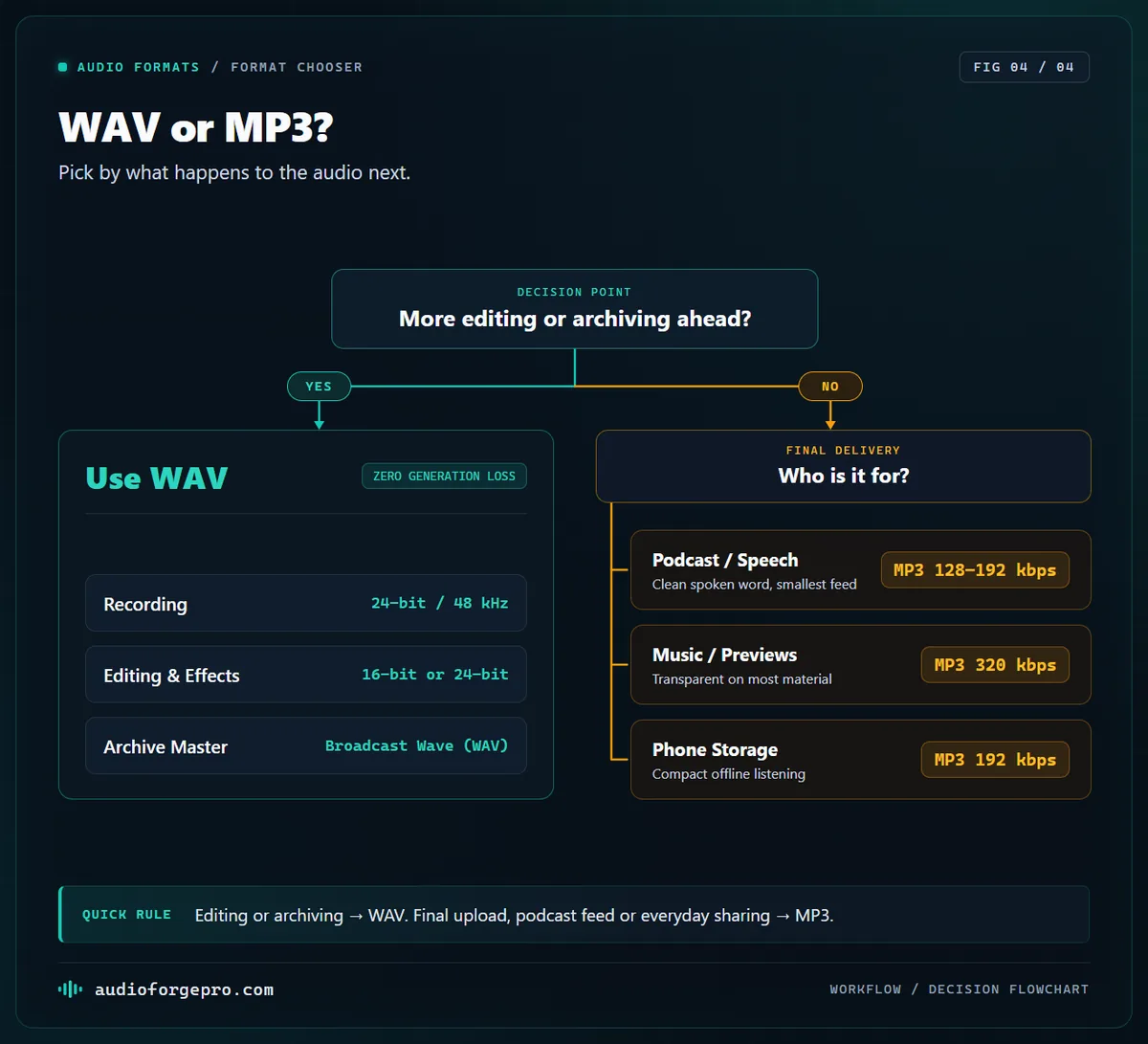
Pick the row that matches what happens to the file next. If more processing is coming, stay in WAV. If the file is going straight to a listener, MP3 is usually enough.
| Use case | Format | Size per 10 min | Audible difference |
|---|---|---|---|
| Recording voice or instruments | WAV, 24-bit / 48 kHz | 172.8 MB | None at capture; more headroom for later gain |
| Editing, effects, speed or pitch changes | WAV, 16-bit or 24-bit | 105.8 to 172.8 MB | Avoids stacking encode losses |
| Archiving a finished master | WAV (Broadcast Wave) | 105.8 to 172.8 MB | Every sample kept |
| Podcast episode delivery | MP3, 128 to 192 kbps | 9.6 to 14.4 MB | Speech rarely shows artifacts at these rates |
| Sharing music or previews | MP3, 320 kbps | 24 MB | Hard to pick out in blind tests on most material |
| Phone storage and offline listening | MP3, 192 kbps | 14.4 MB | Small on earbuds and phone speakers |
Exact File Size Math
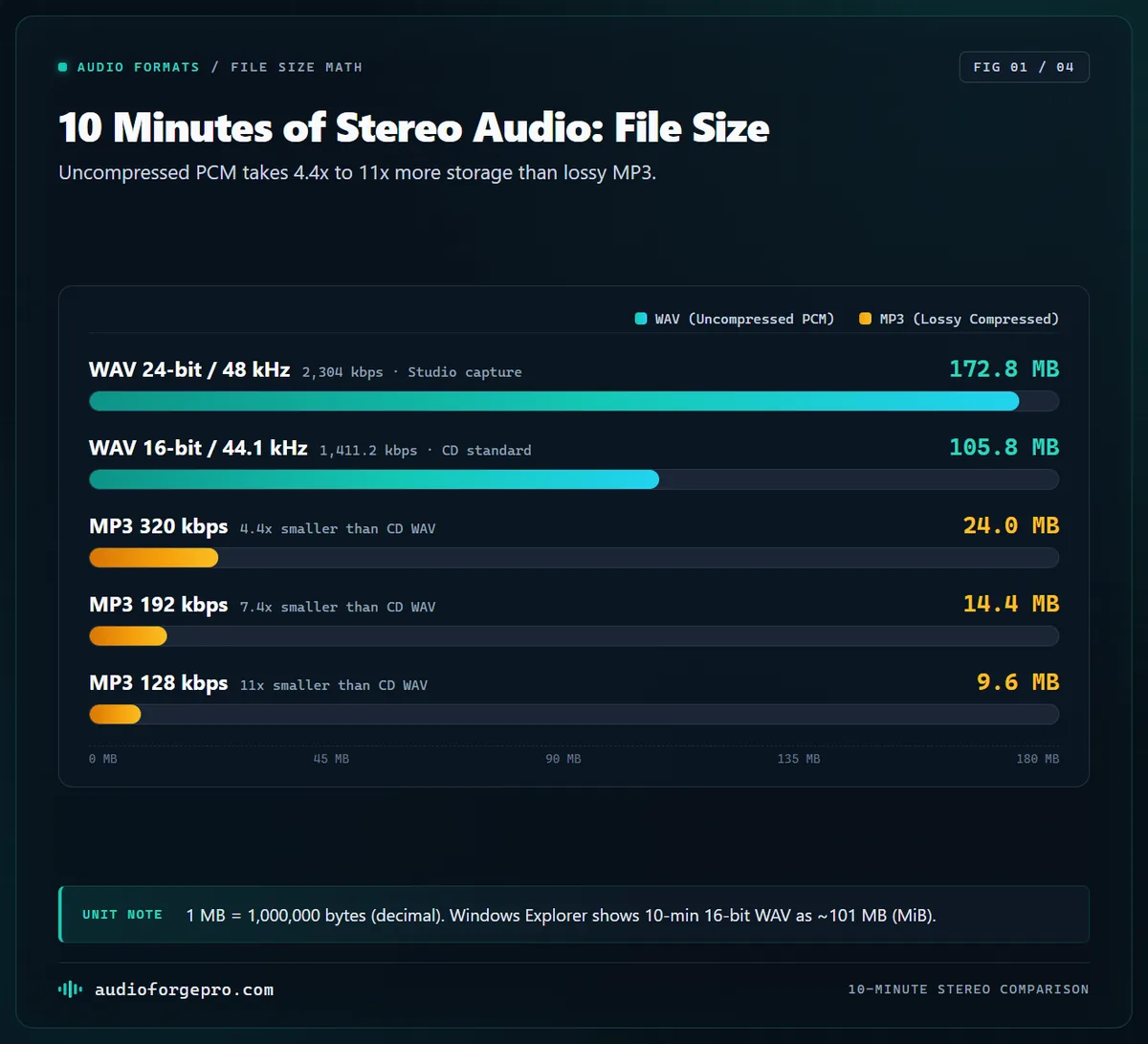
WAV size is fixed by three numbers. Multiply sample rate by bit depth by channels, then divide by 8 to get bytes per second. For CD-standard stereo: 44,100 x 16 x 2 / 8 = 176,400 bytes per second, which is a data rate of 1,411.2 kbps. MP3 size is simpler: divide the bitrate by 8. A 320 kbps file uses 40,000 bytes per second.
| Format | Data rate | Per minute | Per 10 minutes | Per hour |
|---|---|---|---|---|
| WAV 24-bit / 48 kHz stereo | 2,304 kbps | 17.3 MB | 172.8 MB | 1,037 MB |
| WAV 16-bit / 44.1 kHz stereo | 1,411.2 kbps | 10.6 MB | 105.8 MB | 635 MB |
| WAV 16-bit / 48 kHz mono (voice) | 768 kbps | 5.8 MB | 57.6 MB | 346 MB |
| MP3 320 kbps | 320 kbps | 2.4 MB | 24 MB | 144 MB |
| MP3 192 kbps | 192 kbps | 1.44 MB | 14.4 MB | 86.4 MB |
| MP3 128 kbps | 128 kbps | 0.96 MB | 9.6 MB | 57.6 MB |
These figures use 1 MB = 1,000,000 bytes. Windows counts 1 MB as 1,048,576 bytes, so it will show the 10-minute 16-bit WAV as about 101 MB. Constant-bitrate MP3 lands within a few kilobytes of the table. Variable-bitrate MP3 moves up or down with the material, and embedded cover art can add several hundred kilobytes.
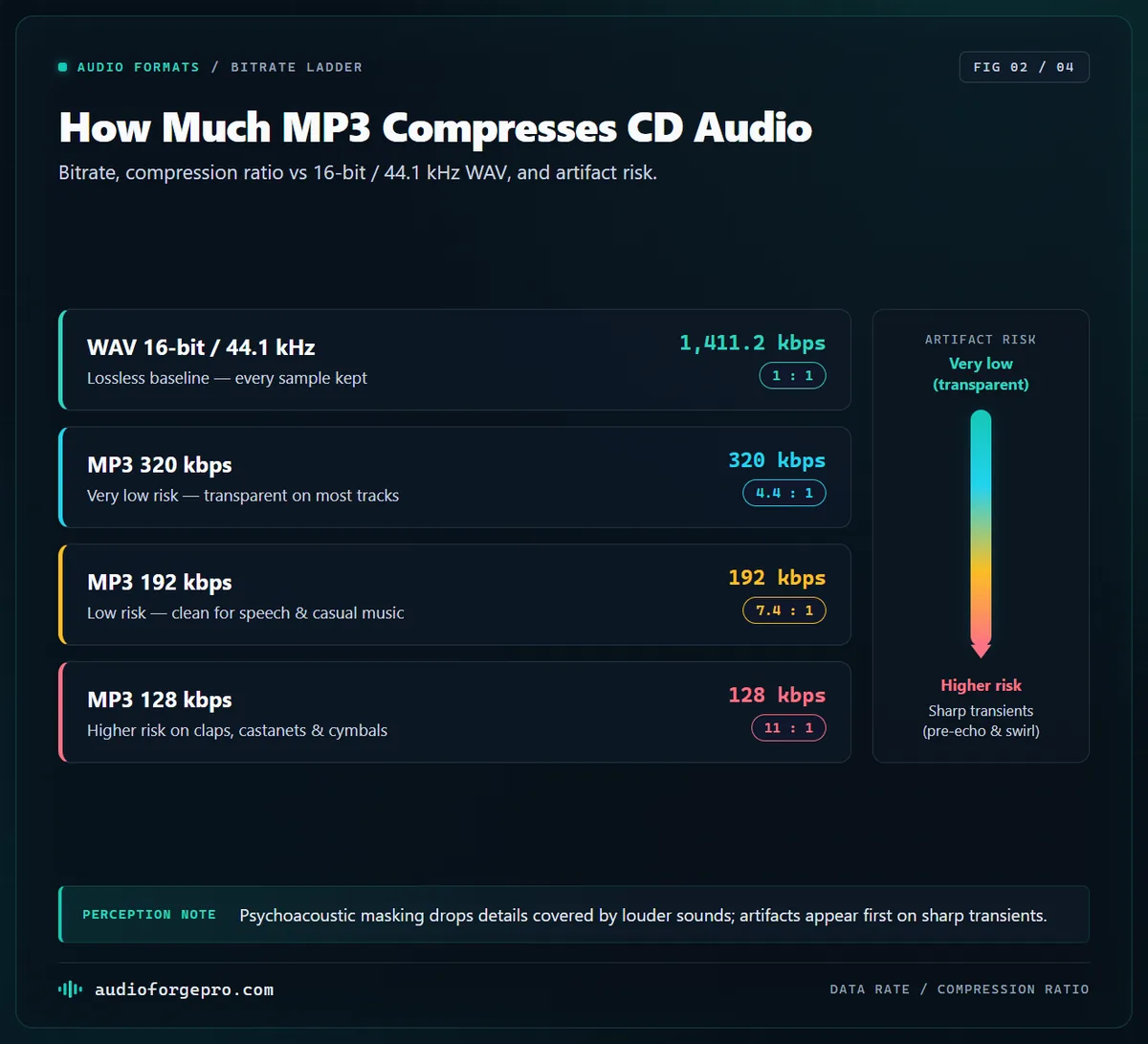
In ratio terms, CD-standard WAV is 4.4 times the size of a 320 kbps MP3, 7.4 times a 192 kbps file and 11 times a 128 kbps file. That gap matters for a phone full of albums or a podcast feed with 200 episodes. It matters much less for one 40-minute interview on a desktop drive.
Can You Actually Hear WAV vs 320 kbps MP3?
An MP3 encoder splits the signal into frequency bands and runs a psychoacoustic model on each short block. Sounds that a louder neighbouring sound would mask get fewer bits or none. The MPEG-1 Audio Layer III standard defines how the bitstream is decoded; how much a given encoder throws away is a design choice. At 128 kbps many encoders also roll off content above roughly 16 to 17 kHz. At 320 kbps very little is removed that most adults can hear.
The evidence is honest but not tidy. Formal codec testing uses double-blind methods such as ITU-R BS.1116, which exists because differences at high bitrates are small impairments that casual listening misses. There is no single landmark study that settles 320 kbps MP3 against WAV for every listener and every recording.
What the controlled work does show is how hard small differences are to hear. In Meyer and Moran's 2007 AES study, listeners tried to detect a CD-standard 16-bit, 44.1 kHz bottleneck inserted into high-resolution playback and scored close to chance across 554 trials. Reiss's 2016 meta-analysis later pooled many such tests and found a small effect that grew with listener training. Both concern resolution above CD quality, not MP3, but they show the pattern: trained ears on chosen material can catch what most people miss.
MP3 has known weak spots. Sharp transients such as castanets, harpsichord plucks and hand claps can smear into pre-echo, a faint wash just before the hit. Dense cymbals can turn swirly at lower bitrates. These artifacts are rare at 320 kbps and common at 96 to 128 kbps on difficult material.
Run Your Own Blind Test
Your speakers and your ears are the ones that count, so test them. Encode a WAV to MP3, decode it back, and match levels within 0.1 dB. Line up the start, because MP3 encoders add a few milliseconds of leading silence. Use an ABX player that hides which file is which and run 16 trials.
Guessing produces 8 correct on average. Scoring 12 or more out of 16 happens by chance only about 3.8 percent of the time, so that is a reasonable bar for saying you heard a real difference. If you score 9 or 10, the 320 kbps file is transparent for you on that track.
Why Editing in MP3 Causes Generation Loss
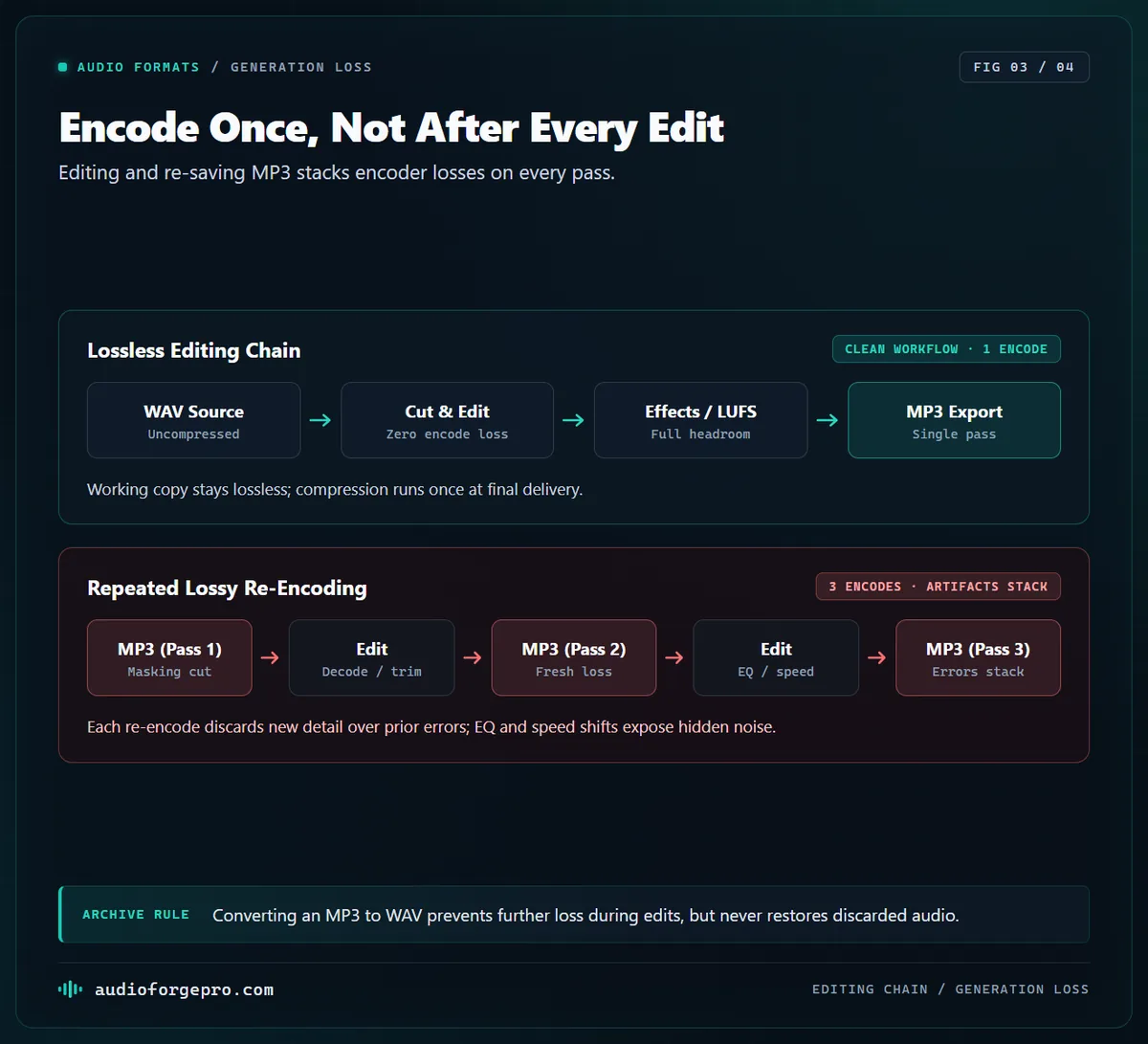
Each MP3 encode discards detail based on what the model expected to be masked in that exact signal. Edit the decoded file and encode again, and the second pass makes fresh decisions on audio that already carries the first pass's errors. Repeat that a few times and the losses stack up.
Processing makes it worse. A treble boost, a heavy compressor or a pitch shift can lift noise that the first encode had hidden under louder content. Slowing a file down moves high-frequency artifacts into a more audible range. That is why engineers keep the working copy lossless and encode once at the very end.
A common case: a guest sends a 128 kbps MP3 voice note. You trim it, add room tone and export at 320 kbps. The new file is bigger, but it cannot sound better than the 128 kbps source. Ask for the original WAV if one exists. If not, edit the MP3, export once, and stop.
When WAV Wins and When MP3 Wins
Podcasts
Record and edit in WAV. Publish MP3. Spoken word holds up well at 128 kbps mono or 192 kbps stereo, and ID3 tags carry the title, chapters and artwork that podcast apps display. Many podcast hosts transcode uploads for delivery anyway, so a WAV upload often ends up as a compressed file for the listener.
Video Editing
Video editors accept both, but WAV avoids encoder delay and decode overhead on the timeline. MP3's leading silence can shift sync by a few milliseconds, which is enough to notice on a clap or a lip movement. If the only copy of a soundtrack is inside an MP4 or MOV, pull the audio track out first and edit that.
Mastering and Archiving
Keep masters in WAV. The EBU's Broadcast Wave specification adds a bext chunk for description, originator and timecode, which helps when you search an archive years later. The Library of Congress WAVE format description lists it as a widely supported preservation format. Store at the bit depth you recorded; there is no benefit in padding 16-bit audio to 24-bit.
Mobile Storage and Everyday Listening
MP3 wins. A 64 GB phone holds roughly 1,100 hours of 128 kbps audio or about 100 hours of CD-standard WAV. Bluetooth earbuds re-encode the signal for the wireless link anyway, which makes a WAV source hard to justify on that playback chain.
A Clean Browser Workflow From Recording to Delivery
The order matters more than the tool. Keep everything lossless until the last step, set loudness on the lossless file, then encode the MP3 once.
- Start from the best source you have. For a video file, extract the soundtrack instead of screen-recording it again.
- Do the editing in Audio Forge Pro's editor and export WAV as your working master. Files are processed in your browser and never leave your device.
- Set delivery loudness on that WAV with the LUFS Normalizer, which measures to ITU-R BS.1770-4 and holds a -1.0 dBTP ceiling. That ceiling leaves room for the small peak overshoot lossy encoding can add.
- Encode once: MP3 at 128 or 192 kbps for spoken word, 320 kbps for music.
- If the audio is going to a video platform, pair it with an image or waveform from the same master.
Audio Forge Pro accepts MP3, WAV, M4A, AAC, OGG, Opus, FLAC, AIFF and CAF, plus MP4, MOV, WebM, MKV and 3GP video files. It exports 16-bit PCM WAV or MP3 at 128, 192 or 320 kbps, with no watermark and no account.
For loudness targets by platform after the export, the YouTube LUFS normalization guide explains what happens to a file mastered louder or quieter than the platform reference.
The Short Version
- Recording, editing, effects or archiving? Use WAV.
- Final file for a listener, a podcast feed or a phone? Use MP3, 128 to 192 kbps for speech and 320 kbps for music.
- Received an MP3? Edit it once and export once. Converting it to WAV will not repair it.
- Unsure if you can hear 320 kbps? Run 16 blind trials on your own material and decide from the score.
Sources
- ISO/IEC 11172-3: MPEG-1 Audio, including Layer III
- EBU Tech 3285: Specification of the Broadcast Wave Format
- ITU-R BS.1116: Methods for the subjective assessment of small impairments in audio systems
- ITU-R BS.1534: MUSHRA method for intermediate audio quality
- Meyer and Moran, Audibility of a CD-Standard A/D/A Loop Inserted into High-Resolution Audio Playback, JAES 2007
- Reiss, A Meta-Analysis of High Resolution Audio Perceptual Evaluation, JAES 2016
- Library of Congress: WAVE Audio File Format
- Library of Congress: MP3 (MPEG-1 Audio Layer III)
Transparent Disclosure: The author is the Founder of Audio Forge Pro. Recommendations reflect genuine relevance to this topic. Core audio processing is free with no login required.
Responses
Join the community discussion. Sign in with Google to post a comment after the page finishes loading.